
MangoTasks1.0.6 - Get APK
You'll be able to download in few seconds.
Publisher Description
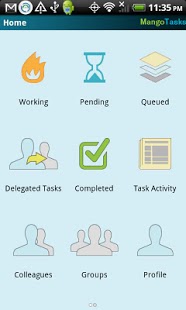
MangoTasks is an easy to use, agile task management tool. Using MangoTasks on Android you can easily add, view, edit, prioritize, share and follow the natural flow of a task from start to completion everywhere you can use your mobile device.
Features include:
· Add, view, edit, share and follow the natural flow of a task from start to completion.
· Inform colleagues of your task progress and be informed of theirs through Task Activity Stream.
· Organize and prioritize your task list while on the go.
· Chat directly with online colleagues about tasks.
Use Case Description:
Tasks in business involve a lot more than just a list of tasks jotted down on scratch paper. Business tasks are not always on your plate. Sometimes you want to stay informed of tasks on other peoples’ plates, even the plates of entire teams. Using MangoTasks, you can easily manage all types of business tasks efficiently and effectively.
How is MangoTasks Different?
· Activity Stream: Throughout the “Task Lifecycle” you can track task activity via “Feeds”. “Task Activity” in the Feature Grid keeps you intimately informed of colleagues’ notes about task progress. In the Task Activity Stream colleagues’ “Profile Picture” and “Online Presence” is shown adjacent to each feed.
· Task Bins: MangoTasks introduces task “bins” to organize your tasks. The bins are constructed to filter tasks that you are actively “Working”, tasks that you will be working on after the current set are “Pending”, and tasks that are not yet scheduled and will be worked upon at a distant later stage are “Queued”. MangoTasks has an easy “Feature Grid” to quickly view tasks from “Working”, “Pending” and “Queued” bins.
· Task Actions: In addition to adding, viewing and editing, MangoTasks lets you take actions on tasks based on your role. Owner of a task can mark it “Started” or “Finished”. Once “Finished” and “Delivered”, the task reviewer can mark the task “Reviewed” before it is moved to the “Completed” bin.
· Due Date and Priority: Organize and prioritize tasks via our simple Task List Interface. Tasks lists can be displayed in two organized layouts: “Group by Due Date” organizes tasks with the least time until the task is due at the top of the list. “Overdue” tasks are shown first, then tasks that are due “Today”, “Tomorrow” and less pressing due dates in descending order. “Order by Priority” is a customizable list of tasks with the highest priory tasks at the top.
· Delegated Tasks: When you create a task that someone else will be executing, you delegate that task to a colleague or a team. “Delegated Tasks” in the Feature Grid filters those tasks that you created but delegated to someone else.
· Real-Time Collaboration: “Online” colleagues can instantly be contacted in MangoTasks via the integrated “IM Chat Client”. Colleagues can also receive “Wall Posts” and “Private Messages” that can be read later.
Learn More:
Learn about other MangoTasks by taking a “Live Tour” from inside or by visiting www.mangospring.com
About MangoTasks
The company that develops MangoTasks is MangoSpring. The latest version released by its developer is 1.0.6.
To install MangoTasks on your Android device, just click the green Continue To App button above to start the installation process. The app is listed on our website since 2011-07-11 and was downloaded 0 times. We have already checked if the download link is safe, however for your own protection we recommend that you scan the downloaded app with your antivirus. Your antivirus may detect the MangoTasks as malware as malware if the download link to com.ms.mangotasks is broken.
How to install MangoTasks on your Android device:
- Click on the Continue To App button on our website. This will redirect you to Google Play.
- Once the MangoTasks is shown in the Google Play listing of your Android device, you can start its download and installation. Tap on the Install button located below the search bar and to the right of the app icon.
- A pop-up window with the permissions required by MangoTasks will be shown. Click on Accept to continue the process.
- MangoTasks will be downloaded onto your device, displaying a progress. Once the download completes, the installation will start and you'll get a notification after the installation is finished.
Program Details
System requirements
Download information
Pricing
Version History
version 1.0.6
posted on 2011-07-11
1.Open chat from Dashboard,2.Refresh functionality on all tasks lists,3.Added ability to understand Guest user,4.bug fixes
version 1.0.0
posted on 2011-03-10
Several fixes and updates
Disclaimer
External Download
We do not host MangoTasks on our servers. We did not scan it for viruses, adware, spyware or other type of malware. This app is hosted by Galad and passed their terms and conditions to be listed there. We recommend caution when installing it.
The APK Download link for MangoTasks is provided to you by apps112.com without any warranties, representations or guarantees of any kind, so access it at your own risk.
If you have questions regarding this particular app contact the publisher directly. For questions about the functionalities of apps112.com contact us.
